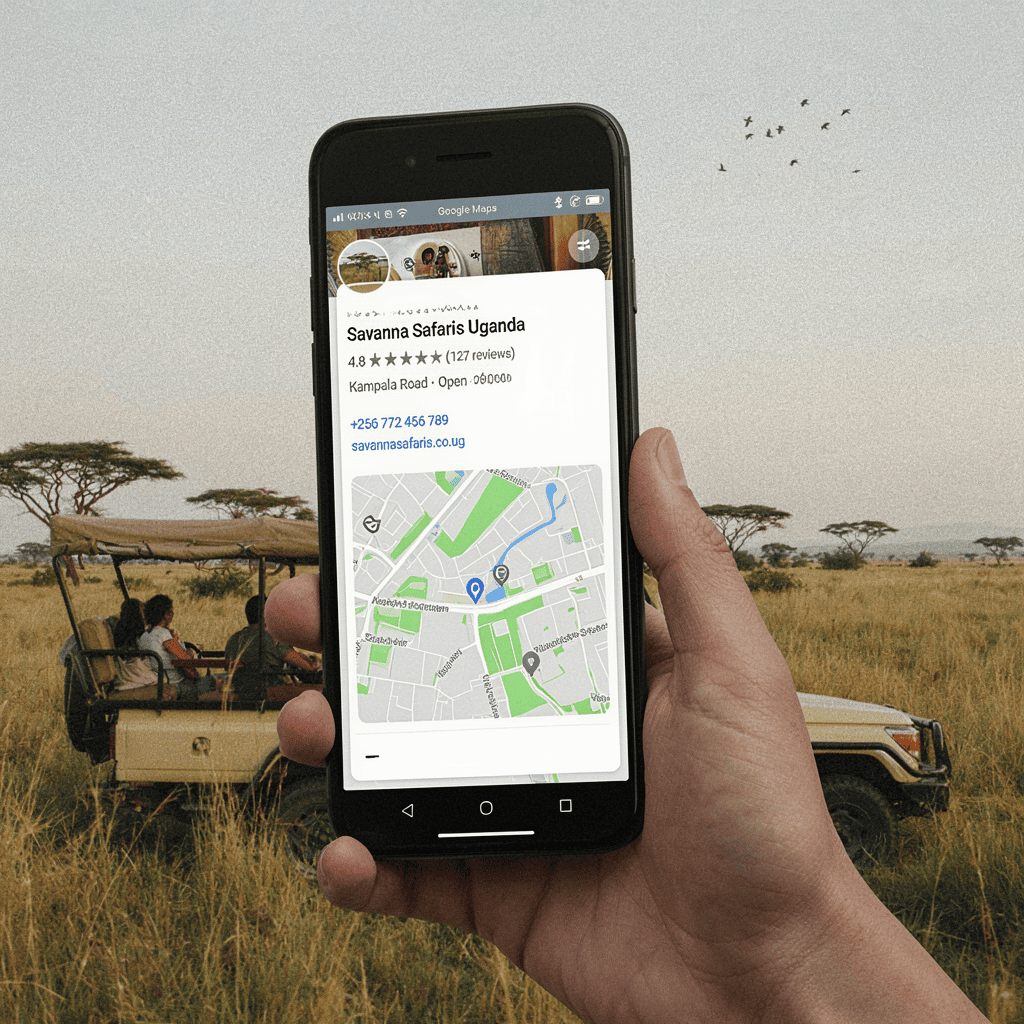
A traveler types something like “Uganda safari company,” “Bwindi gorilla trekking operator,” or “tour companies in Kampala.” Google shows a map. Three or four businesses appear. The traveler clicks on one, reads a few reviews, checks the photos, and sends a WhatsApp message or calls.
If your business is not on that map, you are invisible at the exact moment a traveler is ready to book.
This guide explains how Uganda tour operators, safari companies, lodges, and travel agencies can set up and optimize a Google Business Profile to get more direct inquiries and reduce dependence on expensive middlemen.
What Is a Google Business Profile?
A Google Business Profile is a free listing that appears when someone searches for your business name or for services like yours on Google Search or Google Maps.
It shows important information such as:
- Business name
- Physical location or service area
- Phone number and WhatsApp
- Website link
- Opening hours
- Customer reviews
- Photos
- Questions and answers
- A description of your services
For a tourism business in Uganda, this profile is often the first thing a traveler sees before visiting your website.
If your profile is incomplete, outdated, or missing, you are losing trust and losing inquiries.
Why Google Business Profile Matters More Than You Think
Many Uganda tour operators spend money on a website but ignore their Google Business Profile. That is a mistake.
Here is why:
1. It shows up before your website
When someone searches for “safari companies in Uganda,” Google often shows the map first, above the organic website results. The businesses on that map get the most clicks.
If your business is not there, you are not in the conversation.
2. It builds trust quickly
Travelers want to know you are real. A complete profile with photos, reviews, and a clear location tells them you are a legitimate business with a physical presence in Uganda.
An empty profile or one with no reviews makes a traveler nervous about sending a deposit.
3. It is free
Unlike paid ads, a Google Business Profile costs nothing to create and maintain. The only investment is time and consistency.
4. It influences local searches
Searches like “tour operator near me,” “safari company in Entebbe,” or “lodges near Queen Elizabeth National Park” are local searches. Google uses your profile to determine whether your business is relevant to that search.
If your profile lists Kampala, Entebbe, or Fort Portal as your location, you can appear for those searches.
5. It connects directly to WhatsApp and calls
Google Business Profile allows you to add a phone number and a website link. You can also add a WhatsApp link if you set it up properly. This means a traveler can go from Google search to a WhatsApp chat in two taps.
In Uganda, where WhatsApp is the primary communication channel for tourism inquiries, this is a major advantage.
Step 1: Create or Claim Your Google Business Profile
If you already have a profile, skip to Step 2. If not, here is how to start.
Go to Google Business Profile and sign in with a Google account you use for your business.
Enter your business name exactly as you want it to appear to customers. Do not add extra keywords like “Best Safari Company Uganda” unless that is your legal business name. Google may reject keyword-stuffed names, and it looks unprofessional.
Choose the right business category. For a tour operator, good options include:
- Tour operator
- Tour agency
- Safari tour agency
- Travel agency
- Sightseeing tour agency
- Hotel or Lodge (if you run accommodation)
Select the category that best matches your primary service. You can add additional categories later.
Enter your location. If you have a physical office, add the full address. If you work from home or meet clients at their hotels, you can list a service area instead. Many tour operators in Uganda list their office in Kampala, Entebbe, or a specific town.
Add your phone number with the country code +256. Add your website URL if you have one. If you don’t have a website yet, you can create a free website from Google, but a proper website is better for conversions and trust.
Verify your listing. Google will send a verification code by mail, phone, or video, depending on your situation. Complete the verification as soon as possible. An unverified profile does not appear publicly.
Step 2: Optimize Your Business Description
Your description should tell a traveler exactly what you do, where you operate, and why they should choose you.
Do not stuff keywords. Write like a human.
Here is a poor description:
“Uganda safari tours, gorilla trekking, wildlife safaris, budget safaris, luxury safaris, Kampala tour operator, best Uganda safari company, Murchison Falls, Queen Elizabeth, Bwindi, Jinja tours, Uganda travel agency.”
That is just a keyword list. It reads badly and builds no trust.
Here is a better description:
“We are a Uganda-based safari company organizing private and group tours to Bwindi Impenetrable National Park, Queen Elizabeth, Murchison Falls, Kibale, and Kidepo. Our trips include gorilla trekking permits, 4×4 transport, and experienced local guides. We offer budget, mid-range, and luxury itineraries starting from Entebbe or Kampala.”
That tells the traveler who you are, what you do, and where you go. It is useful and readable.
Keep your description under 750 characters. Use the first sentence to state your core service clearly.
Step 3: Add the Right Photos
Photos are one of the most important parts of a Google Business Profile.
Travelers decide whether to click or call based on what they see.
Add photos of:
- Your safari vehicles (real vehicles, not stock images)
- Your guides and team
- Guests on safari (with permission)
- National parks you visit, but label them accurately
- Your office, if you have one
- Lodge rooms or tents you use
- A welcome sign or logo
Do not use random wildlife photos from the internet. Travelers can tell when a profile is full of stock images, and it damages trust.
Aim for at least 10–20 high-quality photos. Add new photos after every few trips.
Step 4: Activate the Q&A Section
Google Business Profile has a Questions & Answers section where potential customers can ask questions publicly.
Many businesses ignore this section. That is a missed opportunity.
You should seed your own profile with common questions and answer them yourself.
For example:
Question: Do your safari prices include gorilla permits?
Answer: Yes, most of our Bwindi packages include the gorilla permit fee unless stated otherwise. We confirm the exact permit cost with Uganda Wildlife Authority at the time of booking.
Question: Can you pick us up from Entebbe Airport?
Answer: Yes, we arrange airport pickups from Entebbe. Your guide will meet you at arrivals with a sign.
Question: What type of vehicles do you use?
Answer: We use 4×4 Land Cruisers and safari vans with pop-up roofs for game viewing. All vehicles are regularly maintained.
By answering questions in advance, you reduce friction and show that you are responsive.
Step 5: Collect Reviews Consistently
Reviews are the strongest trust signal on Google.
A traveler is more likely to choose a safari company with 40 positive reviews and a 4.8 rating than a company with 3 reviews, even if the second company has a better website.
Here is how to collect reviews effectively:
Ask at the right time
Do not wait until the client has gone home. Ask at the end of the safari, when the experience is fresh and the client is happy.
You can say: “If you enjoyed your trip, would you mind leaving us a short Google review? It helps future travelers find us. I’ll send you the link.”
Make it easy
Create a short Google review link and send it via WhatsApp. You can find this link in your Google Business Profile dashboard under “Get reviews.”
Paste the link into your WhatsApp message and ask the client to write one or two sentences.
Respond to every review
Thank positive reviews. Address negative reviews calmly and factually. Do not argue. A professional response to a negative review can actually improve trust.
Never buy fake reviews
Google detects fake reviews and may suspend your profile. It is not worth the risk. Genuine reviews from real clients are more valuable.
Step 6: Use Google Posts to Share Updates and Offers
Google Business Profile allows you to publish short posts that appear on your listing.
Use these posts to:
- Announce a new safari package
- Share a recent trip photo
- Highlight a special offer for low season
- Remind travelers about permit availability
- Share a client testimonial
Posts expire after a short time, so keep them fresh. Even one post per month is better than nothing.
Here is an example post:
“We still have availability for July gorilla trekking in Bwindi. Our 4-day package includes permits, 4×4 transport, and mid-range accommodation. Message us on WhatsApp for a same-day quote.”
This gives travelers a reason to contact you now.
Step 7: Ensure Your Contact Details Are Consistent Everywhere
Google compares your business information across the web. If your phone number, address, or website appears differently on different platforms, Google may get confused about which information is correct.
This can hurt your local search ranking.
Make sure your business name, phone number, address, and website are the same on:
- Your website
- Google Business Profile
- Facebook page
- Instagram bio
- TripAdvisor listing
- Safari booking platforms
- Any directories
Use the same format everywhere. For example, always use “+256 700 000 000” rather than sometimes “0700 000 000” and sometimes “+256700000000.”
Step 8: Add Your Service Areas
If you serve clients across Uganda, you can list service areas such as:
- Kampala
- Entebbe
- Jinja
- Fort Portal
- Kabale
- Kisoro
- Mbarara
- Queen Elizabeth National Park
- Bwindi Impenetrable National Park
- Murchison Falls National Park
This helps Google understand where you operate and can improve your visibility for searches in those areas.
Step 9: Monitor Your Profile Regularly
Set a reminder to check your Google Business Profile once a week or at least twice a month.
Look for:
- New reviews to respond to
- Questions in Q&A
- Any changes to your contact details
- New photos from customers
- Any notifications from Google
Google may also ask you to update your hours or services. Keep everything accurate.
Common Google Business Profile Mistakes Uganda Tourism Businesses Make
Avoid these mistakes if you want your profile to work for you.
- Using a personal Gmail account instead of a business account
It is better to use a dedicated business email, but if you only have Gmail, at least use an account you will keep forever and that is clearly connected to the business. - Keyword-stuffing the business name
Adding “Uganda Safari Company Gorilla Trekking Tours” to your name when your real name is “Acacia Safaris” looks unprofessional and may violate Google guidelines. - No photos of real vehicles or guides
Travelers want to see who they are booking with. Stock wildlife photos do not build trust. - Never responding to reviews
Responding to reviews shows you care. It also gives Google positive signals about activity. - Using a phone number that is not reachable on WhatsApp
Many travelers prefer WhatsApp. If your listed phone number is not on WhatsApp, you are losing easy conversations. - Listing the wrong location or no location
If Google does not know where your business is, it will not show you for local searches. - Ignoring the Q&A section
An empty Q&A section means travelers ask the same questions by email or WhatsApp, costing you time. Answer them once on your profile. - No link to a website
A profile without a website link makes it harder for travelers to learn more about your packages and pricing.
How to Connect Your Google Business Profile to Your Website for More Conversions
Your Google Business Profile brings the traveler to your front door. Your website then has to convert them.
When a traveler clicks from your Google profile to your website, they should land on a page that answers their questions and makes the next step obvious.
At minimum, your website should have:
- A clear menu with your top safari packages
- A WhatsApp button that works on mobile
- Your phone number as a click-to-call link
- A contact page with your physical address and email
- Trust signals like reviews, guide photos, and vehicle photos
- A simple inquiry form
If your Google profile is strong but your website is weak, you will get clicks but few bookings. If your website is strong but your Google profile is invisible, you will have fewer clicks in the first place.
Both need to work together.
When to Get Professional Help
Setting up a Google Business Profile is simple. Optimizing it for local search and connecting it to a conversion-focused website takes more time and expertise.
If you are a Uganda tour operator, lodge, or travel agency that wants to:
- Appear more often in local Google searches
- Get more direct WhatsApp and phone inquiries
- Collect and manage reviews effectively
- Turn Google clicks into actual safari bookings
Smart Choice UG can help you with local SEO, Google Business Profile optimization, and tourism website development.
We focus on practical digital solutions for Uganda tourism and hospitality businesses. You do not need to figure everything out alone.
Visit Smart Choice UG to discuss your business.
Frequently Asked Questions About Google Business Profile for Uganda Tourism
Is Google Business Profile really free for Uganda safari companies?
Yes, it is completely free. You do not pay Google to appear on the map or in local search results. The only investment is time spent setting up your profile, adding photos, and responding to reviews.
How long does it take to set up a Google Business Profile?
The basic setup takes less than an hour if you have your business information ready. Verification may take a few days to a few weeks depending on the method Google uses. After verification, you can continue optimizing over time.
Can I use WhatsApp as my contact on Google Business Profile?
You can add a WhatsApp link in the website field or in the appointment link field. There is no dedicated WhatsApp field, but many Uganda businesses list their WhatsApp number as the main phone number. Make sure that number can receive WhatsApp messages.
How many reviews do I need to rank higher on Google Maps?
There is no magic number, but more positive reviews generally help. A profile with 20–50 genuine reviews and regular recent reviews will often outperform a profile with no reviews. Focus on getting a steady stream of reviews after every trip.
Should I list my office address if I work from home?
If you do not have a physical office, you can list a service area instead and hide your address. This is allowed and can still help you appear for searches in the areas you serve. Be honest about your setup.
Can I manage my Google Business Profile on my phone?
Yes. You can download the Google Business Profile app on Android or iPhone and manage your listing, respond to reviews, add photos, and post updates from your phone. This is useful for guides who are often on the road.
What happens if someone leaves a fake negative review?
You can flag the review to Google if it violates policies. If Google does not remove it, respond professionally with a factual explanation. Do not accuse the reviewer publicly. Most travelers can tell the difference between a genuine complaint and a fake review.